A switching decision
Eagle or Linger for Mac? Compare Your Reference Workflow
Keep Eagle if it already serves your library. Consider Linger for a private local Mac workflow centered on personal notes and remembered clues. Test the context around your files before moving them.
Start with the reason you would leave.
If Eagle already handles your formats, browser capture and retrieval, keep it while you test a specific unmet need. Eagle is available for Mac and Windows with a 30-day trial and a one-time purchase. Linger offers one-time licenses for macOS (Personal $39, Lifetime $79) with download links and activation codes delivered by email October 8–15, 2026. Eagle’s official features and availability.
We make Linger. This is a documented workflow comparison and a sample-check plan, not a hands-on Eagle benchmark or a completed migration. It concerns Eagle’s design-asset organizer.
- Stay with Eagle if your main need is already covered by its asset library, file support or existing search tools. Its official search guide describes keyword scope, tag rules, filters and Smart Folders. Try the relevant control before moving your collection.
- Explore Linger’s demo if you want a local Mac reference library built around your own notes and remembered clues. Linger also imports managed copies, so switching does not solve a requirement to leave every file in its original folder.
- Choose another kind of tool if you mainly need a board you can reopen and deliver, or a shared online collection. The workflow comparison separates project boards, discovery and reusable libraries.
Compare the work you actually do.
| Your requirement | Eagle | Linger |
|---|---|---|
| Availability | Mac and Windows downloads; 30-day trial. | macOS licenses available ($39 / $79 one-time). Download links and codes sent by email Oct 8–15, 2026. |
| Keep context | Documents browser capture, URLs, tags and annotations. | Memory holds a title, Feeling, tags and a Source URL. Supported browser media capture records page and media URLs separately. |
| Retrieve a reference | Documents keyword search, filters and Smart Folders. | Keyword Recall uses stored text and source fields, with source, media and date filters. Optional model tasks need separate setup; their quality is not benchmarked here. |
| Keep existing file paths | Check Eagle’s library arrangement against your current workflow. | Imports copies into its managed local library; it does not work as a zero-copy index of your existing folders. |
| Move an Eagle library | Keep your existing library and backup while evaluating another tool. | No supported Eagle-library or .eaglepack importer. Importing image files does not establish that Eagle metadata transfers. |
| Work across computers | Supports Mac and Windows; check the vendor’s current sharing and storage instructions. | macOS, with device allowances depending on the license. Separate local libraries; no built-in cloud sync. |
Eagle’s UI-reference walkthrough covers capture, source URLs, tagging and reuse in project folders. These are useful capabilities to preserve when switching. A one-time purchase is not a Linger-only advantage.
A copied image is only half the move.
You need the file and the information that makes it useful. Check those separately before moving your working library.
Run five checks on a small sample.
Make a separate sample folder with a few files you own: an ordinary image, a screenshot, a web reference with a known page, a file with notes and tags, and your hardest required format. Keep the original library intact. The count is a practical starting point, not a performance test.
Download the five-task checklist. Fill in your app versions, sample files and observed results. Empty result fields mean “not tested.”
- Bring in a copy and inspect it. Use the candidate’s supported import path. Compare the opened file, dimensions and file type with your original. Check disk use. If a required format does not open correctly, keep that work in your current tool.
- Keep the context. For the same item, check the title, original page, media URL, note and tags. Close the item and return. Record which fields survived and which required manual entry. A picture appearing in a grid is only the file portion of this check.
- Find it from a clue. Search a word already in your note, then a source domain. Try the filters you rely on. Record both the desired hit and extra candidates. A word absent from all saved fields is a separate test; do not assume two apps interpret it alike.
- Finish your real task. Open the file in the application you use for work. Check any required color, file-type or multi-folder behavior there. If your deliverable is a saved board, quit, reopen and export it. Linger’s current Canvas is temporary and does not pass a persistent-board requirement.
- Prove you can leave or recover. Use the vendor’s documented export or backup path on the sample. Check files and context separately in the result. Restore into a separate test location. Do not delete the working library because a folder of image files exists.
For Linger, a full local-library backup includes the database and managed files, made with the app closed. That backup is for recovery; it is not a verified cross-app metadata export. We have not validated an Eagle-to-Linger transfer or a restore in this article.
Use a known retrieval result as a starting point.
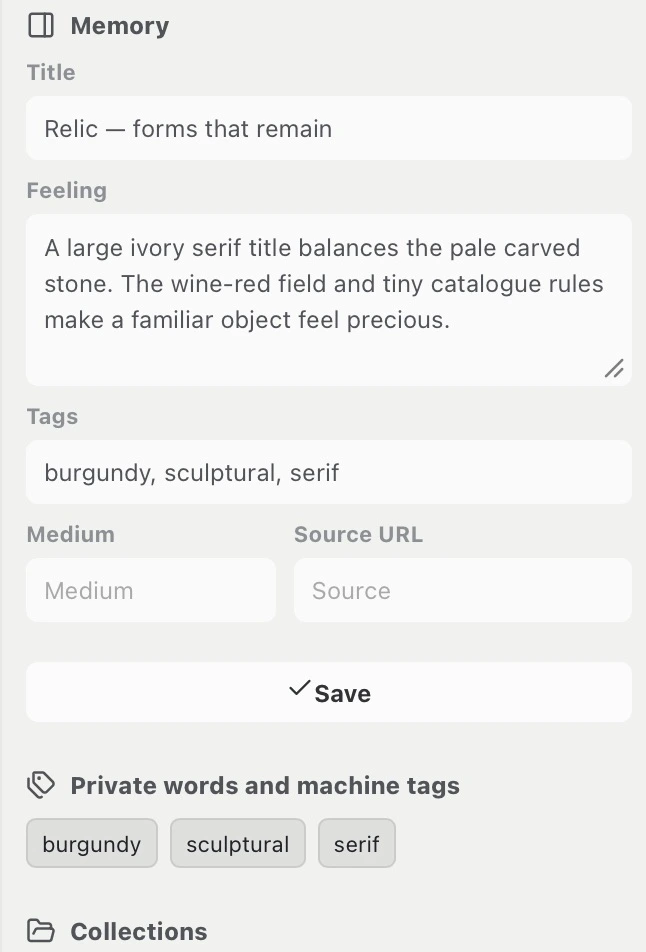
On October 7, we imported Relic into an isolated library in the installed Linger 0.3.1 app, saved its note and three tags, and found it with catalogue. After adding a missing clue, nostalgic found it too, including after quitting and reopening the app. This checks Linger’s own save-and-retrieve sequence; it does not establish migration quality or measure Eagle.
See the exact queries, results and failed-query example. For your own trial, use your own files and write down the missing context before deciding whether to switch.
If the picture transfers but the source or notes do not, retain the original library and make a separate source record. If no necessary task improves, staying with Eagle is a useful outcome.
What supports this comparison.
Eagle’s availability, capture and search descriptions come from its official pages linked above, read on October 3, 2026. We did not install Eagle or time a comparative task. The October 7 Linger screenshots and save-and-retrieve results come from the installed 0.3.1 Mac app with one image in an isolated library; see the method and result record. This local test does not establish an Eagle migration or public delivery.
We have not established lossless Eagle metadata migration, full format parity, a shared-library workflow or comparative performance. The downloadable checklist is blank for your results, not a set of product scores.
Found an inaccurate claim or a changed control? Contact Linger with this page URL, app version and the relevant official source. Please keep private collection files out of the first message.